Quick Search


Latest on coronavirus disease outbreak

Signs and symptoms of coronavirus disease 2019 (COVID-19) may appear two to 14 days after exposure. This time after exposure and before having symptoms is called the incubation period. Common signs and symptoms can include:

DEAR LADIES..

He won’t use condoms, you use pills. Why? Because he wants it natural? (THINK OF OVARIAN CANCER AND INFERTILITY) He gets you pregnant, you..

DO NOT DO THIS DURING SEX

.... 3. Having an orgasm first, then not bothering if your partner should have an orgasm or not. That is pure selfishness do something to make them reach there5. Making reference to a technique an ex used to...do great to you, that is unhealthy comparison and will..

How to Use Watch Later on YouTube

When you're browsing YouTube, you usually come across videos you don't want to watch right this second, but you can make time for them in the future. Use YouTube's Watch Later feature to...

NO REGRETS IF PATRONIZED

EMMYDEE home of bee, they bait bees and harvest PURE HONEY. Contacts digits: Isaac +234 803 555 2445, +234 806 743 5603. Ebenezer +234 803 556 0301, +234 909 615 9490. Oluwakayode +234 803 649 8887, +234 909 142 0005

How to use WhatsApp on computer without phone

First of all, you need to download an Android Emulator called BlueStacks on your PC. To do this, open your....

LET's TALK: What Do You Think Should Be The Right Punishment For Coronavirus Patients Who Runs Away From Isolation Centres?

As the coronavirus and it’s fear bites harder, so does the fear of hunger and also ignorance kill Nigerians.

Showing posts with label Tutorial. Show all posts

Tuesday, June 30, 2020

Upcoming Artist? Here’s How You Can Use Twitter More Effectively

Building a community on Twitter might be difficult for upcoming artists. With these five helpful tips, you can excel on the complicated social media platform.

Twitter is a complicated place. You most times wonder why you’ll tweet a post and get two retweets and some random person will tweet the same thing and get huge numbers.

As an artist, mastering what interests people on Twitter might seem difficult. Still, with consistency and these few tips, you could be on your way to converting your audience to listeners and also having a community peculiar to you.

Here’s how you can use Twitter more effectively:
1. Use Pinned Tweet To Promote Recent Release
The pinned tweet feature isn’t there for no reason. It’s a helpful tool to help highlight your favourite or most popular tweet. People have also harnessed this feature to make people notice a sale, a campaign or bring awareness to something they want others to see.

As an artist, use the pinned tweet feature to highlight your recent release, so when random people visit your profile, they can see links to your latest track or project.

2. Follow and reply to similar artists
Together, we can achieve more, the saying goes. Being an artist means you’re part of a vast community of other artists whose sound might be similar to yours.

So when a fellow artist drops a song, show support. Retweet, comment and engage with their tweets. Opportunity for a collaboration could prop up.

Do this for producers and music business professionals too. This way, you’re being noticed and when they retweet or reply, their followers might flock to your page.

3. Contribute to trending hashtags and topics
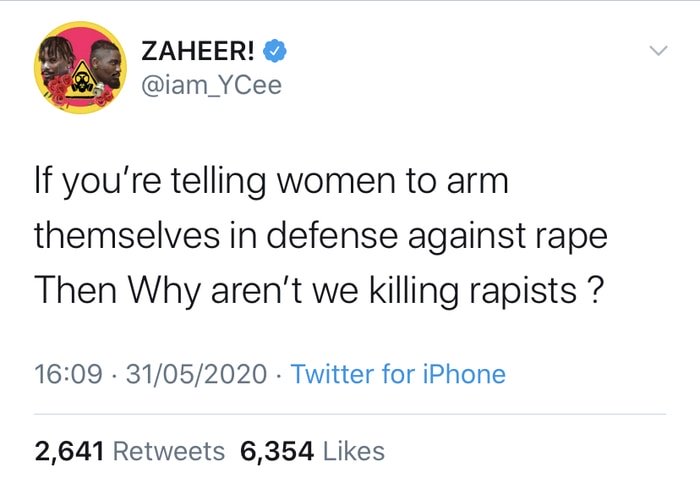
It’s not everyday music is an artiste night trend. Much of the trend table might be occupied by football bants or Twitter gist.

Occasionally, you might see Ycee or WizKid throw jokes about football or the political situation of the community.

As an artist, you have a voice. Utilize it. Speak and have a say on what’s happening in the country.

This way, when people click on trending topics, your tweet might come up among the top tweets and if what you say is meaningful, it could spark up a conversation.

4. Engage and Converse More With Your Followers
Being an artist means you have people who enjoy your sound and stream your music a lot. You have an audience. The next stage is to grow these existing audience to a community. Ardent supporters. Die-hard followers. Staunch fanatics who will shout your name and your art to the world.

Achieving this means you have to engage with their tweets and also reply when they tag or prop up in your mentions. Hard to do, but the benefits are numerous. This brings you closer to the fans and establishes a connection with them.

5. Organize A Contest Or Challenge
Contest is a way of measuring the strength of your fanbase and indirectly a promotional strategy.

Last week, Rema had all the girls dancing to Ginger Me because there was a challenge attached. Vibe to Ginger Me and stand a chance of winning a date.

It’s what also thrives on platforms like Triller and TikTok with artists offering cash prizes to people who dance to their songs.
Doing a contest or challenge would surely bring in more engagements and also get you some followers.

In all, be creative and witty. Make sure you show up every day and add your own voice to trending issues. Don’t copy another artist’s style of engagement because what works for Peter might not work for Paul.

Did We Miss Out Any Strategy?

Or Do You Have Any Other Tip That Might Help Upcoming Artists?

Let us know in the comments section 👇

Monday, June 29, 2020

How To Apply For N-Power 2020 Registration And Requirement (Read Full Details)

Have you heard this news about Npower Registration 2020/2021 Form? We will show you how to apply online. If you read this well, you will secure a job for yourself through Npower Nigeria.

Do you want to apply for this job? If yes, then here are the right procedures to apply for this job.

Npower registration 2020 started June 26th, 2020, you need to ensure you apply online.

REQUIREMENTS FOR NPOWER REGISTRATION 2020

The online application form is free, there are no registration charges. Npower will never ask you to make payment any account in regard to this online recruitment.

Npower recently said that applicants will present their BVN details during the proceeds of this requirement.

According to our findings, the bank verification details will be used to checkmate applications well. This is one of the measure Npower is using to ensure that the current beneficiaries stay of the registration.

The minimum age for Npower registration 2020 is 18 years. While the maximum age is 35 years. If your age falls within the mention bracket, then go-ahead and submitter your online registration form.

Npower Nigeria will also require your personal identifiable information like; Names, Phone number, age, gender, and address. If you have a well-arranged CV, you can simply show include all of them there.

CURRENT VACANCIES AT NPOWER NIGERIA REGISTRATION PORTAL

There are so many programs on Npower registration page. You need to choose programs that match your career goals. If you are interested in teaching, then you can go ahead and fill up Npower teachers form.

In case you’re interested in building and designing, then you need to fill select the Npower registration 2020 form for N-Build.

If you want to pursue your career in the health sector, then go ahead and fill up the Npower online registration for N-health officers.

Npower also offers n-tech programs, you can register for the Npower tech program if you’re interested in technology. This particular Npower program will help you learn how to be more creative. Like we’ve said before now, the 2020 Npower registration is free.

CAN SOMEONE WITH DISABILITY APPLY FOR NPOWER REGISTRATION?

Yes, Npower is for everyone, if you know someone who is disabled and for qualified for the job, then you can tell him/her to visit the noower registration 2020 portal to apply.

Npower Online registration is open for, take the one step today to apply for this recruitment today.

IS NPOWER REGISTRATION FOR SSCE/WAEC/NECO?

As of the time of filling this information, Npower is welcoming application higher education graduates and O’ level holders.

The current Npower registration for graduates and undergraduate. If you have gotten all the required documents, the go-ahead today and apply online Npower form.

CAN I FILL NPOWER REGISTRATION FORM WHILE WORKING IN ANOTHER COMPANY?

The BIG answer is no, Npower will fish you out. They will use your Bank BVN to track you down. If you’re already working in a firm or in a government agency, you don’t need to fill up the online registration form.

The main reason why Npower will not accept someone working in another company is because Npower is a government program targeted toward the unemployed Nigerian youths.

HOW MUCH IS NPOWER REGISTRATION FORM?

The application form is free. Please report anyone who asks you to pay money in other to get this job application form.

To start your online application today, kindly visit the official Npower 2020 registration website now.

Before applying for Npower batch c registration 2020, you have to fully understand the type of Npower job you are applying for.

Kindly Click HERE to register

Comment Below If You Have Any Issue During Registration, Thos Who Has Register Will Surely Help You out.

Drop Your Comment If this Is Helpful
Drop your comment 👇

Thursday, June 18, 2020

Helpful Strategies In Video Subtitling

The initial issue faced by most editors is the editing of footage using multi-language. This is especially true when the editors do not have a background knowledge about the spoken language. Good thing, video subtitling services are widely available to be the cost-effective solution for this concern. Generally, minimal adjustments from the standard subtitling services are required for the step-by-step process of video subtitles. It is very essential to know these Spanish subtitling adjustments as they are factors for the success of a project.

Mostly, the subtitling rates and the subtitling rates per minutes should also be considered for a project. Since subtitling services are rapidly growing, these are comparable to dubbing and other localization process.

That’s why you need to be very keen in doing the subtitling services. And here are some of the strategies that you must have to know about the said subtitling services.

Tips to Remember for Subtitling Services

1. Minimize the footage for costs reduction: Most of footage of the video source is not being used. There are some contents that can eat up most of the time of the video footage like marketing clips. It is important to know that getting rid of the unnecessary elements not needed in the footage is very crucial.

2. Re-evaluate the character restrictions:
In subtitling services, the assurance of readability should depend on the firmness of length limitations. Because of the expansion on the korean subtitling services, it simply means that it should be properly edited to comply with the character restrictions. Generally, a primary challenge in video subtitling services is the balance of readability having an accurate translation. Yet, this is not a major concern for editors.

3. Re-analyse the flow of languages: A similar and mostly an exact representation of what is spoken in the video footage is primarily the key. However, this doesn’t mean to make a flawless viewing experience. Knowing this, it is really essential to give emphasis on the subtitles translations as it may be very helpful for the video editor. There are editors that may ask for subtitles in segment by sentences in full. Meanwhile, there are others that may require literal translations that have really different sentence structures. Meaning, it is better to analyse the sentence structure and flow of language in order to give way on the usability of the subtitling services in video footage.

4. Examine the working process: In most multimedia localization, one of the best methods is to examine your work process. However, most of the projects in subtitling comply with the standard process of post-production. It is very important to examine the proposed format of the video footage to guarantee that the editor can incorporate it appropriately and cut the footage.

5. Update the subtitles when completely done: The moment the video footage is already finalized, checking the subtitles is the best way to do. Moreover, keep in mind that the subtitles are text sensitive. The way the video segments flow from one scene going to the next may generally affect the meaning. This should be seen in the final subtitle.


Let's hear from you, is this explanatory enough and does it meet your need?
If Yes, drop a 'I Love this' in the comment box. 
If No, we 'll be glad to know where it's not clear. Thanks 

Wednesday, June 17, 2020

How to Use "Watch Later" on YouTube

When you’re browsing YouTube, you usually come across videos you don’t want to watch right this second, but you can make time for them in the future. Use YouTube’s Watch Later feature to save them all in one playlist.

How to Use Watch Later on the Web
You can think of Watch Later as a designated playlist. It has a special place in the Library tab, and it’s usually easier to add a video to Watch Later than to add it to a playlist.

READ ALSO: Amazing Ways To Silence Your Generator

You can add a video to Watch Later without even opening the video page. Just hover over a video thumbnail and then click on the “Watch Later” button (it has a Clock icon).
Click on Watch Later button
The video will be instantly added to your Watch Later queue. Click on the “Library” tab from the sidebar.
Click on Library tab from sidebar
Here, you’ll first see the “History” section. Scroll down until you see the “Watch Later” section. There will be recently saved YouTube videos here. You can click on a video and it will start playing, but this will directly open the video’s page and play only the specific video.

If you want to use the Watch Later feature as a makeshift queue, where you save videos to Watch Later all day and you come back at night to watch three to four videos together, you’ll have to click on the “See All” button next to Watch Later.
Click on a video to play it or click on See All button to open the playlist view
This will open the Watch Later playlist. Now, you can click on a video.
Click on a video from the Watch Later playlist to start the playback on web
It will open in the playlist view, with the playlist docked on the right.
Watch Later Playlist view while playing a video
To rearrange videos in the playlist, grab the “Handle” icon and move the video around. To delete a video from the playlist, click on the “Menu” button and then select the “Remove from Watch Later” option.
Click on handle bar to rearrange or use menu bar to remove the video from the playlist

How to Use Watch Later on Mobile
The Watch Later feature is also available in the YouTube app on the iPhone, iPad, and Android.

YOU MAY LIKE: Bill Gates Denies Offering $10 Million For Passage Of Health Bill By Reps

When you find a video you want to watch later, tap on the “Menu” button.
Tap on menu button on the video title
From the menu, select the “Save to Watch Later” option.
Tap on Save to Watch Later on mobile
If you already opened the video and are on the video’s page, tap on the “Save” button.
Add captionTap on the Save button from
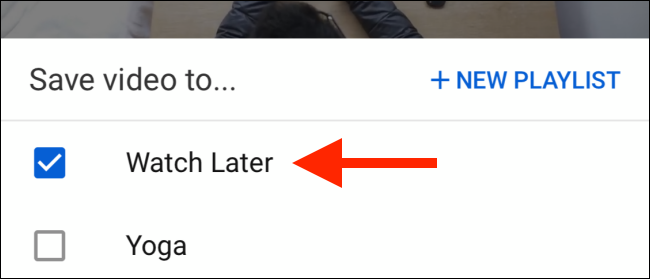
Here, the “Watch Later” playlist will be selected. You can select more playlists if you wish.
Select playlists
Tap on the “Done” button to complete the action.
Tap on Done button to save the video to Watch Later
Now, tap on the “Library” tab from the bottom toolbar.
Tap on the Library tab on mobile
Here, scroll down and tap on the “Watch Later” button.
Tap on the Watch Later option in Library
You’ll see the list of videos in the playlist. Tap on one video to start the playback.
Add captionTap on a video from Watch Later
Unlike the web version, the Watch Later feature in the mobile app directly loads the playlist, so videos will play one after the other.

In the Watch Later section, tap and drag on the “Handle” button to move the video, or tap on the “Menu” button for options.
Use the handle bar to move the video or the menu button for options
From the options menu, you can tap on “Remove from Watch Later” to delete a video from the Watch Later playlist.
Tap on Remove from Watch Later
If you’re privacy-conscious, you can use a new YouTube feature that automatically deletes YouTube history after a set time frame.


Let's hear from you, is this explanatory enough and does it meet your need?
If Yes, drop a 'I Love this' in the comment box. 
If No, we 'll be glad to know where it's not clear. Thanks 

Wednesday, September 27, 2017

How to use WhatsApp on computer without phone (Video)


 First of all, you need to download an Android Emulator called BlueStacks on your PC. To do this, open your favorite browser and visit www.bluestacks.com.
Click on “Download BlueStacks” options on the website page.

After downloading the BlueStacks application, install it on your laptop.
After the application has finished installing, go to your desktop and double-click on the BlueStacks shortcut to open the application.

Once you’ve launched the application, you should see a list of popular applications. If WhatsApp is among them, select it and click on the install option.
Android apps available on bluestacks
After installation of WhatsApp on your computer, open the WhatsApp by double-clicking on it on the WhatsApp icon on your desktop.

You will be asked to provide your mobile phone number or home phone number. Enter the number and wait for a verification code which will be sent via SMS. If you are using a home phone number, you will see a verification failed message with a “Call Me” option on your system. Select the “Call Me” option, so that the code can be dictated to you over a voice message.

Once you have the verification code, enter it in the pop-up on your PC screen.

Your account will be created and ready for use if you entered the correct code.

You can now start chatting with your contacts from your computer.
Now you know how to use WhatsApp on PC without a smartphone. You can also use other social messaging applications on BlueStacks. Note that there are other ways you can use WhatsApp on a laptop without a smartphone but this is by far the easiest and best of them all.

Watch how to use WhatsApp on PC without Smartphone below:


We'll like to know if the tips is helpful. Let's hear from you, 
Use the comment box please 👇